How to Copy Trade on MetaTrader 5 over the Internet
Copy trading is the simplest way to take part in the markets without watching charts all day. This guide explains how copy trading on MetaTrader 5 works over the internet, what you need to prepare, and the setup steps from the beginning until your first trade is copied.
What is copy trading?
Copy trading is a service that automatically copies trades from a master account to your trading account. When the master opens a position, your account opens the same position. When the master sets a Stop Loss or Take Profit, or closes a position, your account follows.
What usually sets one copy trading service apart from another comes down to three things: where the signals come from, where your money is held, and how transparent the master's performance is.
How copy trading over the internet works
In the past, copy trading in MetaTrader usually required the master and follower accounts to run on the same computer or the same VPS. Copy trading over the internet removes that limit. The flow is:
- The master opens, modifies or closes a position.
- The signal is sent to a relay server over an encrypted connection.
- The server forwards the signal to every account following that master.
- The Receiver EA in your MT5 calculates a lot size that fits your capital, then executes the trade on your own broker account.
Because the connection runs over the internet, you can use any MT5 broker. Symbol names that differ between brokers (for example XAUUSD and XAUUSD.m) are mapped automatically.
What you need
- MetaTrader 5 desktop (Windows). Running it on a VPS is recommended so it stays active 24 hours a day.
- An MT5 trading account, demo or real. A hedging account is recommended so each copied position is recorded separately.
- A stable internet connection.
- The Receiver EA file and a license key. To try it out, leave the key empty and the EA runs in a 3-day trial mode.
Steps to set up copy trading in MT5
- Choose a master. Browse the master accounts and their performance history tracked by ShowMyTrades. Look at drawdown and trading style, not just the profit percentage.
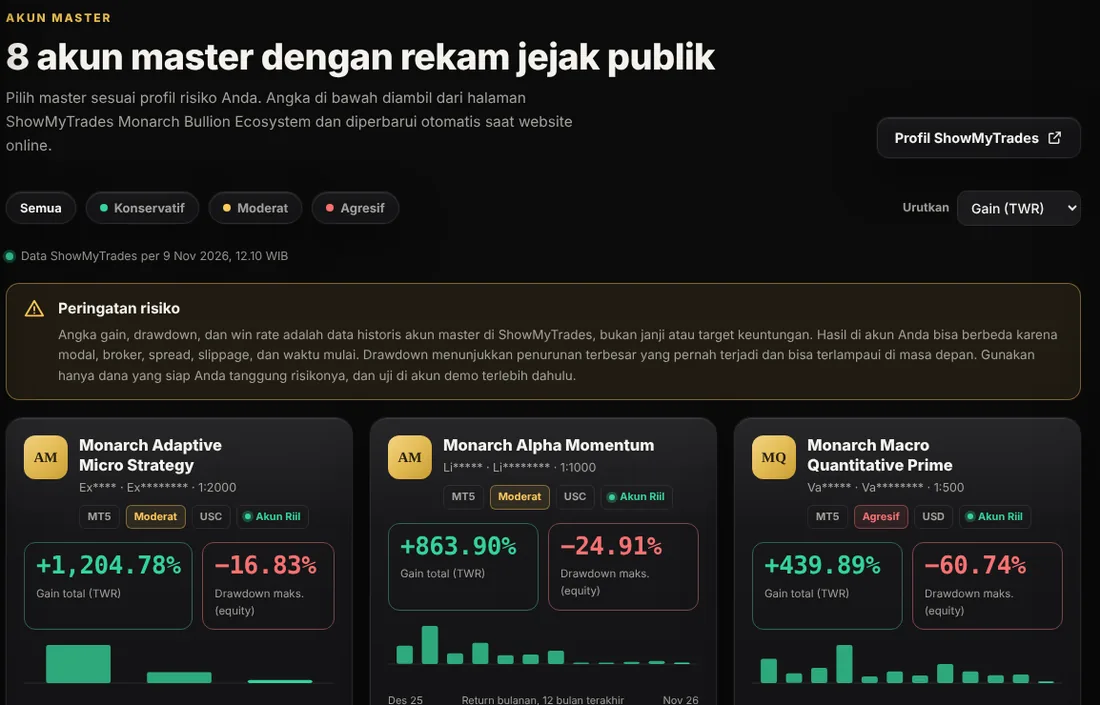
The Master Accounts section of the Monarch Bullion website. - Register as a free member in the Member Area, then download the Receiver EA and its user guide from the Download page.
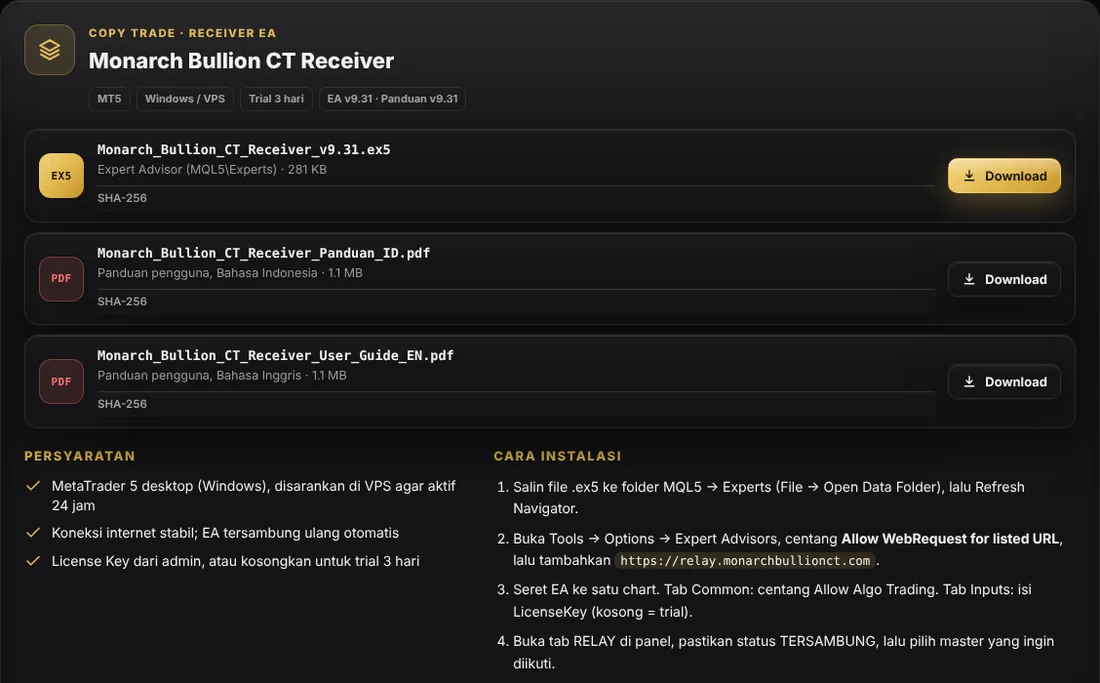
Download page: the Monarch Bullion CT Receiver card. - Copy the EA into MT5. In MT5 open File › Open Data Folder, go to
MQL5 › Experts, copy the EA file there, then right-click Expert Advisors › Refresh in the Navigator panel.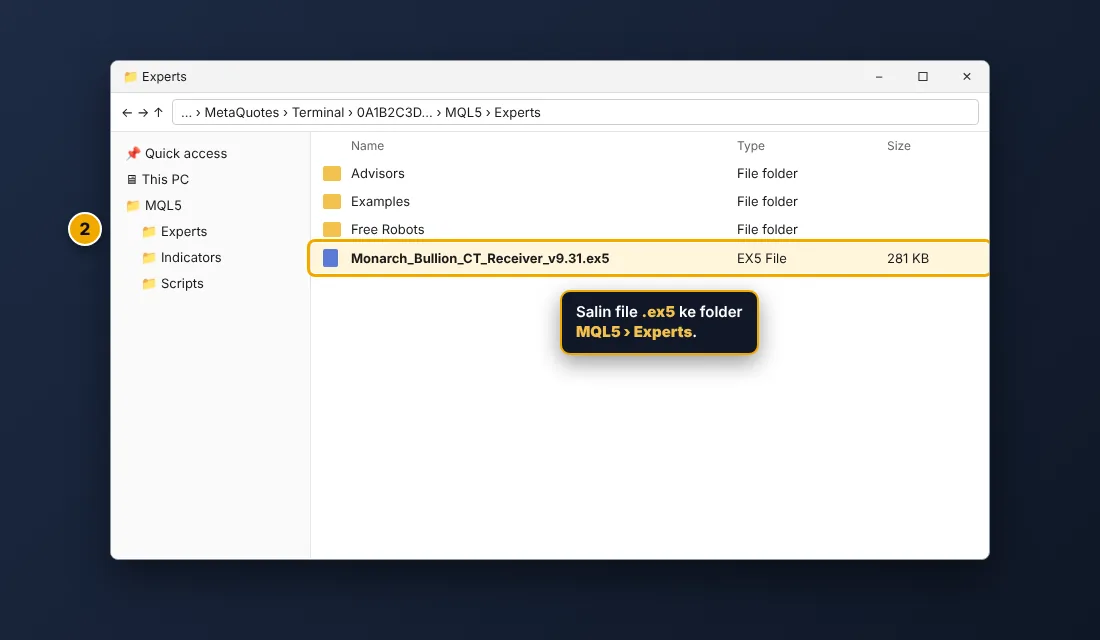
Illustration of the MetaTrader 5 interface. - Allow the relay server address. Open Tools › Options › Expert Advisors, tick Allow WebRequest for listed URL, then add
https://relay.monarchbullionct.com. Without this step the connection will fail.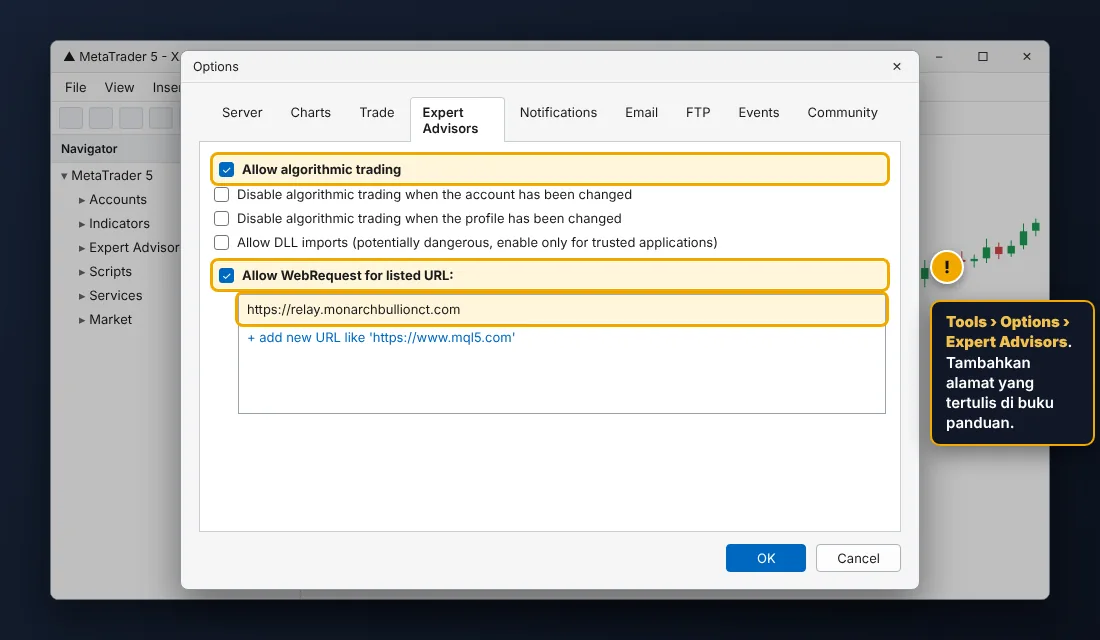
Illustration of the MetaTrader 5 interface. - Enable Algo Trading on the MT5 toolbar until the button turns green.
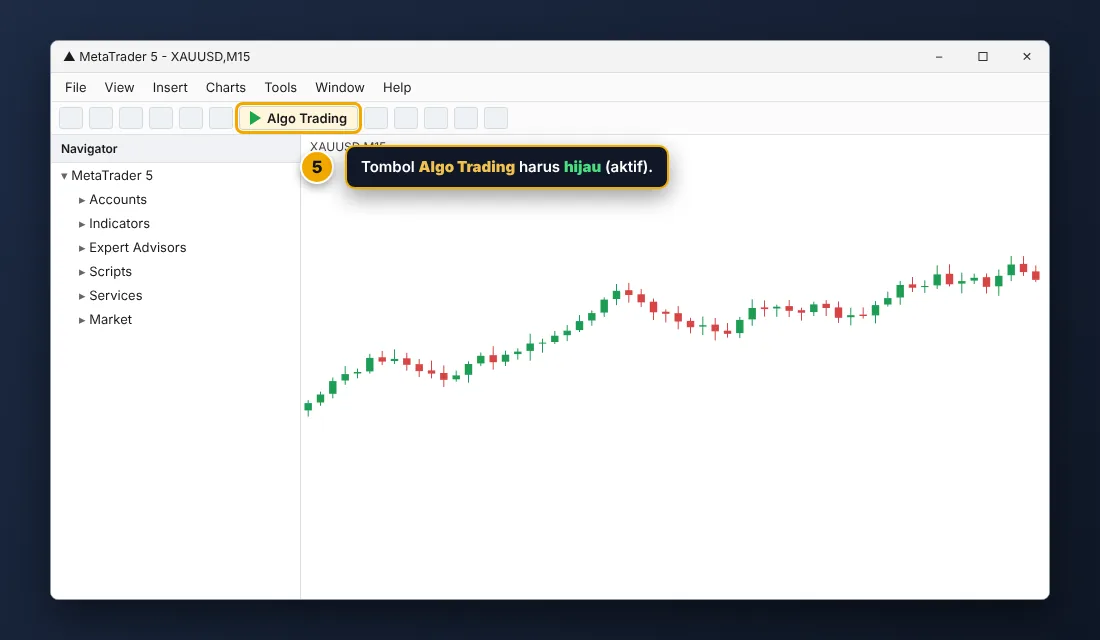
Illustration of the MetaTrader 5 interface. - Attach the EA to one chart (any symbol and timeframe). On the Inputs tab, enter your license key (or leave it empty for the trial) and choose the master you want to follow.
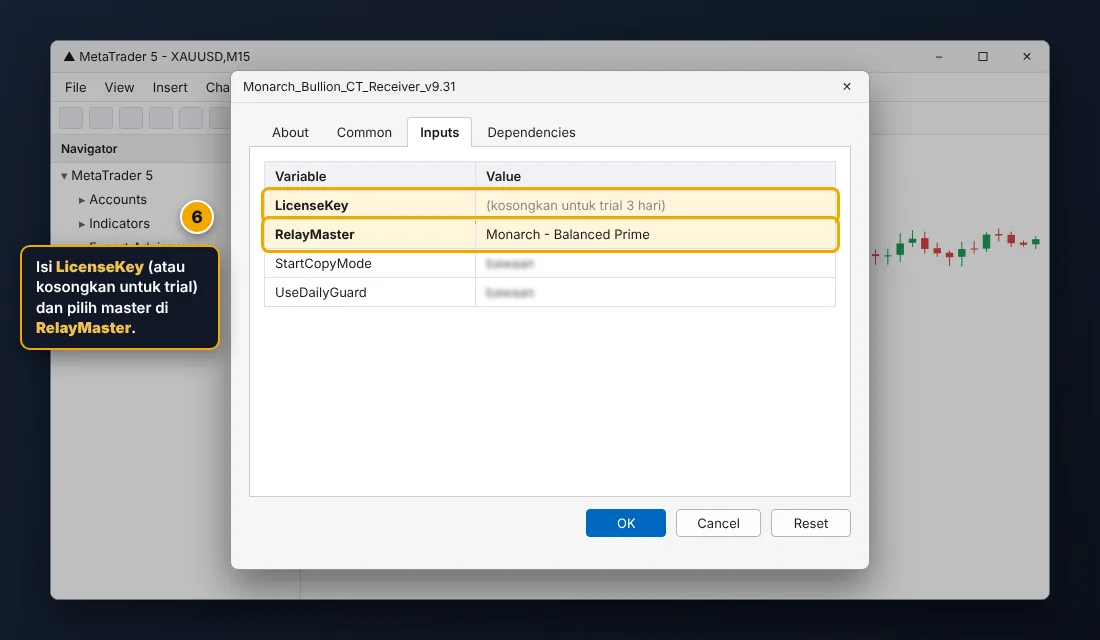
Illustration of the MetaTrader 5 interface. - Check the panel. On the RELAY tab, the status must read TERSAMBUNG (connected). If the master is offline, the EA waits and resumes automatically when the master comes back online.
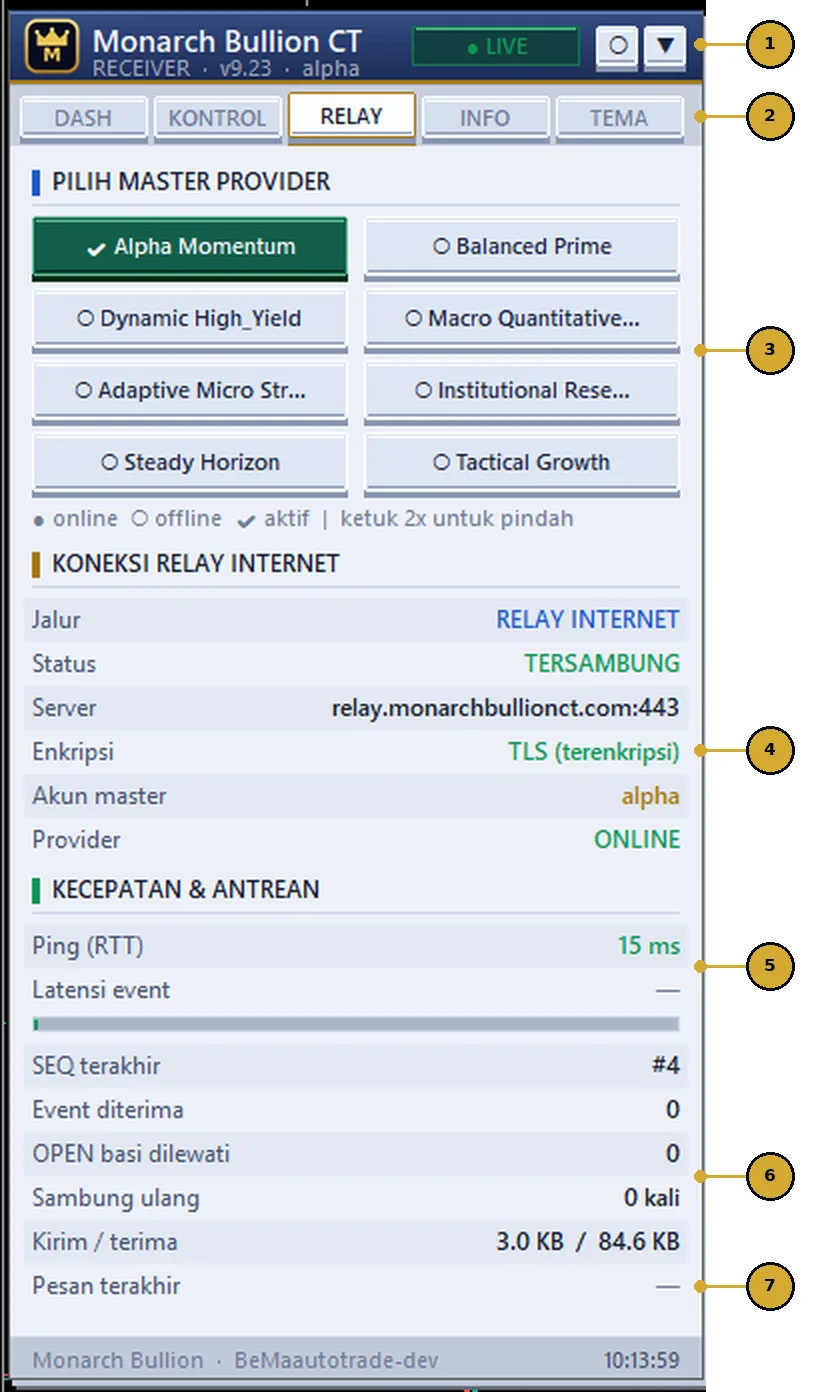
CT Receiver panel, RELAY tab showing a connected status (from the user guide).
Tips for safer copy trading
- Start with a demo account or small capital to understand how the master behaves.
- Use the safety tools such as a daily drawdown limit, a maximum number of positions and a spread filter.
- Do not attach the same EA to two charts on the same account, because trades can be copied twice.
- Use a VPS. The EA only works while MT5 is open and connected to the internet.
- Understand that results can differ from the master's because of differences in spread, commission, slippage and broker execution speed.
Quick questions
Do I have to use a specific broker?
No. The Receiver EA works with any MT5 broker that offers the symbols the master trades.
Can I switch masters?
Yes. You can change the master directly from the EA panel without reinstalling.
Is profit guaranteed?
No. Copy trading is still trading, and trading carries a risk of loss. A master's past performance does not guarantee future results.
Try free for 3 days
Register as a free member to download EAs and user guides, or ask the admin to help you choose the right product.
More articles
Trading forex, gold and crypto carries high risk. Past performance does not guarantee future results. Monarch Bullion is a trading software provider, not a broker, investment manager or financial adviser.